
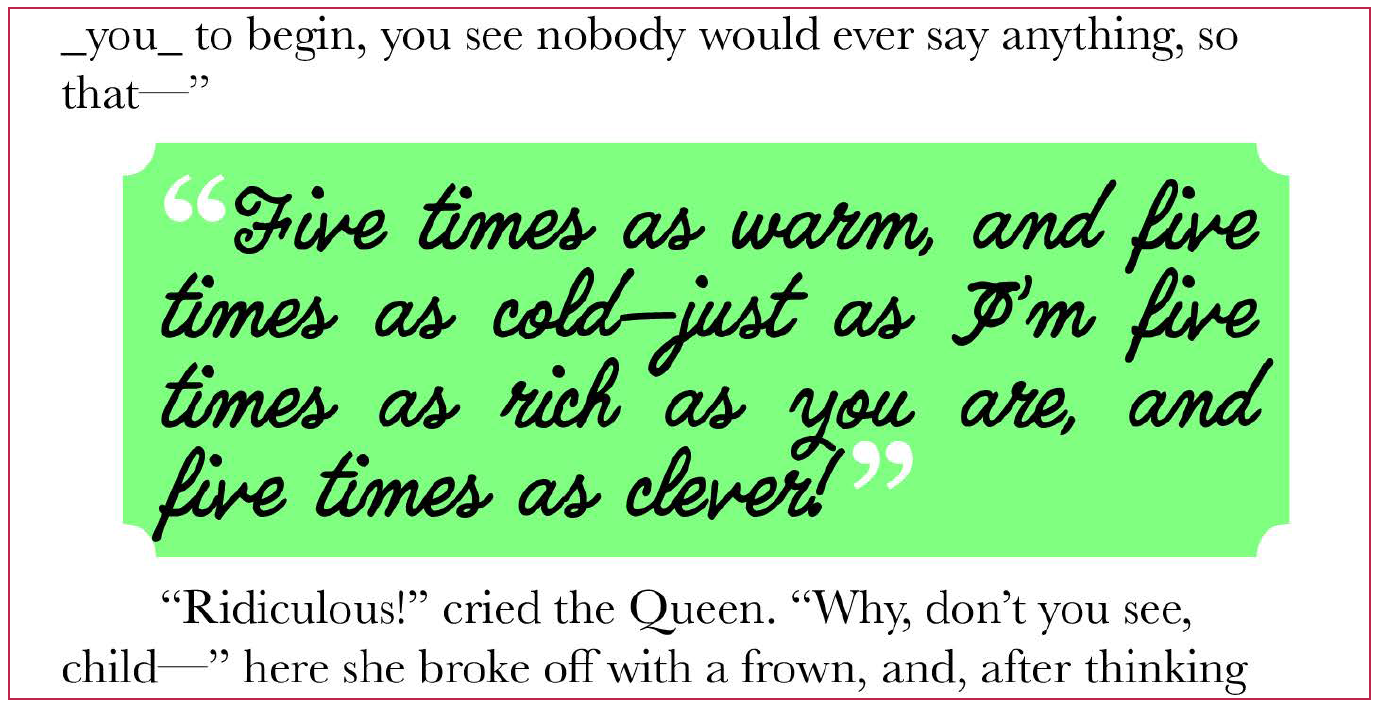
Let’s say you have a would-be pullquote like the bland paragraph I have highlighted below. You’d like to format that so it grabs attention (which is the whole purpose of a pullquote), and you’d like to format the starting and ending quotations without having to manually highlight them and apply character styles. GREP styles to the rescue!

- Create a paragraph style for the body of the pullquote, and a character each for the opening and closing quotes. Make these look however you desire. I created a paragraph style called unironically, Pullquote. My character styles are Pullquote Open and Pullquote Close.
- Edit your paragraph style.
- On the GREP Style pane of Paragraph Style Options, create a GREP Style.
- Set the Apply Style filed to Pullquote Open (or whatever you named yours), and the To Text field to
~{, which is the GREP code for an opening quotation mark. If you forget the code, you can insert it by clicking on that@symbol special character menu and choosing Quotation Marks > Double Left Quotation Mark. - Create a second GREP Style configured to show Pullquote Close and using this code:
~}. Your quotation marks should now style independently of the pullquote itself. Tweak your character styles as needed.


Excerpted From
InDesign Masterclass: Text Techniques book by Pariah Burke.
You must be logged in to post a comment.