
If you’ve ever listened to the radio and heard those slick, high-energy sweeps between songs, those punchy station identifiers, or those perfectly timed promotional announcements, you’ve experienced radio imaging at work. But if you’re new to radio production or looking to sharpen your skills in Adobe Audition, the sheer volume of specialized terminology can feel overwhelming. What’s the difference between a sweeper and a stinger? When do you use a bumper versus a button? And what exactly is a “donut” in radio terms?
Understanding radio imaging terminology isn’t just about memorizing definitions. It’s about grasping the strategic building blocks that create a station’s sonic identity and keep listeners engaged. Whether you’re producing imaging for a rock station, a news format, or creating branded content for podcasts, these terms form the foundation of effective audio branding. In my Adobe Audition Radio Imaging Liner Production course, we dive deep into these concepts, but this introduction will give you a solid starting point for understanding the language of radio imaging.
The Big Picture: What Radio Imaging Really Means
At its core, radio imaging represents the composite of all the sonic elements that brand and position your station or show in the listener’s mind. Think of it as the station’s audio personality, made up of IDs, sweepers, beds, stagers, promos, effects, and more, all working together to create a cohesive listening experience. This is different from the music or talk content itself—imaging is the connective tissue that holds everything together and tells listeners where they are and why they should stay.
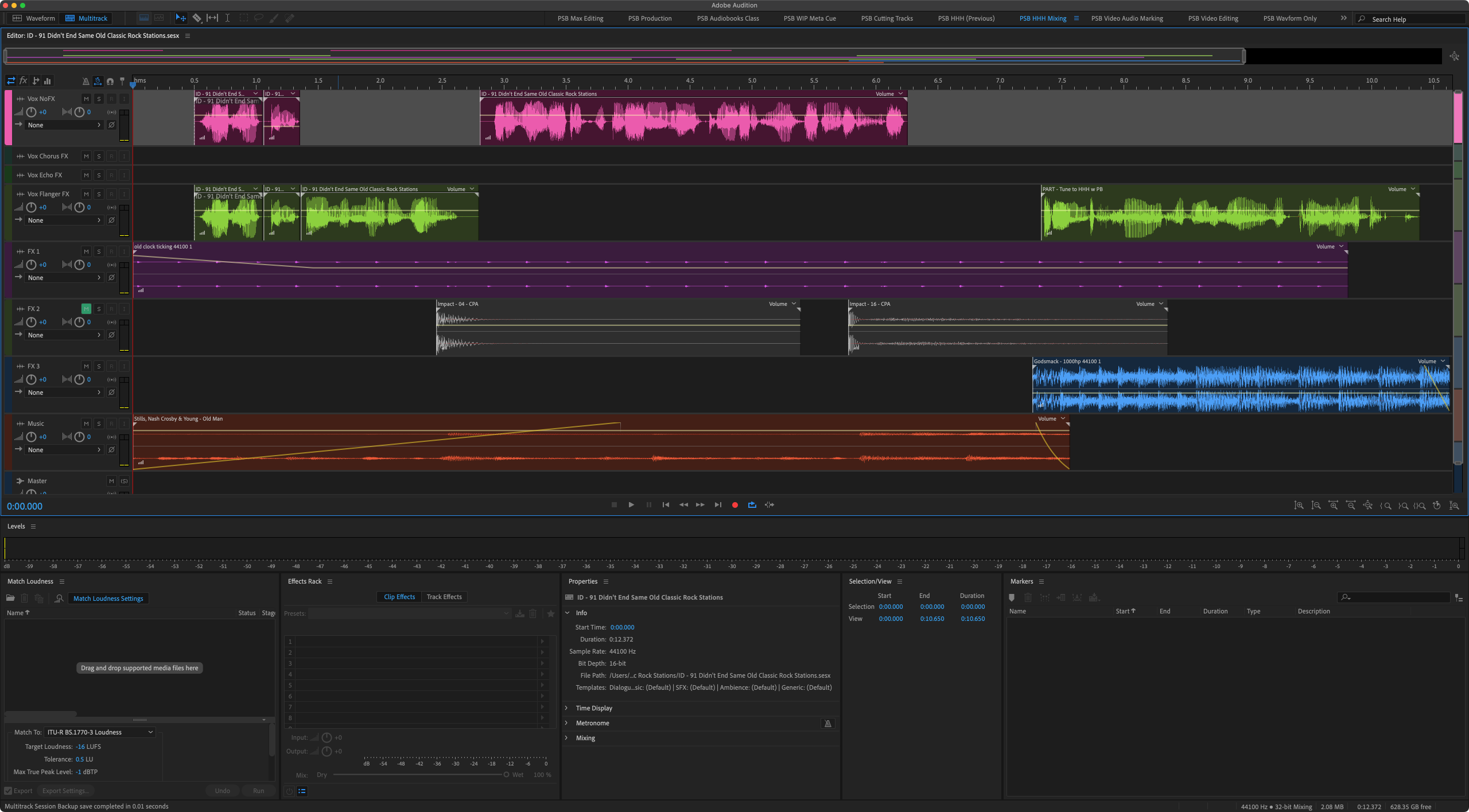
There’s an important distinction to understand between station imaging and show imaging. Stationwide pieces brand the overall station, like “Rock 101.9, Portland’s Rock Station,” giving listeners a clear sense of the format and geography. Show-specific imaging, on the other hand, brands a particular program or daypart, such as show intros, outros, and feature stagers that make individual shows memorable and distinct. For example, the below show ID for my The Hard, Heavy & Hair Show with Pariah Burke syndicated weekly rock radio show. In my Adobe Audition courses, I emphasize how to create both types effectively, since understanding this difference shapes how you approach production choices.
Core Branding Elements That Define Your Sound
Every radio station has a handful of fundamental imaging pieces that appear throughout the broadcast day. The station ID, sometimes called a legal ID, is a short identifier that includes the call letters, frequency, and city of license. These are legally required at specific times but also serve as constant reminders of the station’s identity. A well-produced station ID can be both functional and memorable.
Sweepers are perhaps the most recognizable imaging elements to casual listeners. These short, produced pieces typically feature voice and effects and play between songs or segments to identify and position the station. A sweeper might say something like “More rock, less talk, Rock 101.9” with a punchy music bed and dramatic effects underneath. The sweeper’s job is to reinforce the station’s brand without interrupting the flow of content.
Closely related are liners, which are short voiced phrases or sentences that state a positioner, slogan, or attitude. Liners can be dry (voice only) or lightly produced, and they might be live-read by a DJ or pre-produced. These quick statements keep the brand messaging consistent throughout programming. Tags and stagers serve as brief punctuating lines or sounds. A tag might close out a promo with a final branded statement, while a stager introduces or “stages” the start of a feature with a quick voiceover and sonic hit.
The slogan or positioner is the recurring phrase that captures your station’s format or promise. Examples include “New Rock First,” “Non-stop Country,” or “News That Matters.” This phrase becomes the verbal anchor that appears inside sweepers, liners, and promos, creating consistency across all imaging elements. When students work through exercises in my Adobe Audition Radio Imaging Liner Production class, developing and integrating a strong positioner is always a key focus.
Promos, Teasers, and Show Branding
Promotional announcements, or promos, are produced pieces that promote shows, contests, events, or features. Running typically between ten and sixty seconds, promos combine voiceover, music, and effects to create anticipation and drive listener action. There are two main categories: topical promos are time-sensitive and tied to specific dates, events, or contests, like concert giveaways or holiday programming. Generic or evergreen promos avoid specifics so they can run anytime, such as “Weekdays at 3, The Afternoon Drive with your favorite rock classics.”
Teasers, or teases, are shorter elements designed to create intrigue for something coming up next or later in the programming. “In minutes, your chance to win tickets” is a classic tease that keeps listeners from tuning away during a commercial break. Show opens or intros are the signature imaging that launches a specific show, often featuring theme music, clips, and voiceover that establish the show’s personality. Conversely, show closes or outros provide the branded signoff element, sometimes with sponsor tags or a tease to the next program.
Music Beds and Transitions
The music bed, often simply called a bed, is an instrumental track that plays under voiceover and carries the mood and pacing for promos, IDs, and talk breaks. Selecting the right bed is crucial because it sets the emotional tone and energy level of the imaging piece. In my Adobe Audition Introduction Audio Editing course, we spend considerable time on working with beds, including how to edit them, loop them seamlessly, and mix voiceover appropriately.
A shell is a fully produced promo or sweeper structure with a “hole” left for local or updated voiceover to be dropped in later. This allows stations to create flexible templates that can be quickly customized. The ramp is the instrumental intro before vocals begin in a song, and savvy imaging producers often play their voiceover elements over the ramp so the VO finishes right as the vocal starts, creating a seamless transition.
Segs, or segues, are transitions from one element to another. Imaging pieces often sit in or define these transitions between songs, helping maintain forward momentum. Top-of-hour imaging, specifically, refers to the cluster of elements at the start of each hour, including the legal ID and sometimes a short music montage or news sounder that signals the hour change.
Short Punctuators and Effects
Some of the most impactful imaging elements are also the shortest. Stingers are very short musical or effects hits that punctuate a line or mark a transition. They can run standalone or be integrated into longer pieces for added emphasis. Bumpers, or bumps, are short elements that transition into or out of stopsets, news segments, or network joins. You’ll often hear phrases like “We’ll be right back” or “You’re listening to…” serving this bumper function.
Buttons, also called outs, are brief musical or effects hits at the very end of a piece or break, providing a clean, decisive finish. A shotgun or shotgun ID is a very short, high-impact sweeper or ID, usually just call letters or the station name plus a massive sonic hit—think “K-R-O-Q!” with explosive effects. Whooshes, sweeps, and hits are generic terms for effects that create movement between elements, including rises, swells, and impacts that add energy and polish.
Voiceover and Jingles
Understanding voiceover formats is essential for imaging production. Dry VO means voice only, with no effects or music, recorded clean for later use in multiple mixes. Wet VO or fully produced means the voice is already combined with music, effects, and processing, ready to air as-is. The imaging voice or station voice is the signature talent who reads most of your imaging and becomes a key part of brand identity. Choosing the right voice and maintaining consistency is crucial.
Donuts are music or jingle pieces with a hole in the middle for local or updated voiceover, usually featuring sung or branded fronts and backs. Jingles themselves are sung identifiers or slogans, often with a consistent melodic logo that reinforces the brand name, frequency, or positioner. The sonic logo or audio logo is an even shorter melodic or effects motif that instantly signals your brand—those three-note or four-note signatures that become synonymous with a station.
Production Foundations
Sound design encompasses the overall creative treatment of effects, beds, processing, and voiceover that gives your imaging its unique texture. This is where artistic vision meets technical skill. Processing and chain refer to the compression, EQ, limiting, and other tools used on imaging elements to make them match and cut through the station’s broadcast chain. In my Adobe Audition Podcast Production class, we cover many of these same processing techniques that apply equally to radio imaging, podcast production, and other audio content.
Understanding format clocks, stopsets, and benchmarks helps you know where imaging fits into the larger programming structure. A clock or format clock is the planned hour layout showing where songs, breaks, news, and imaging placements occur. Stopsets are clusters of commercials, and imaging often opens, closes, or splits these commercial breaks. Benchmarks or features are recurring content positions like “90s at 9” or “Traffic and Weather Together,” usually branded with their own stagers and imaging packages.
Moving Forward with Confidence
Radio imaging terminology might seem dense at first, but each term represents a specific tool in your creative toolkit. Once you understand the function of sweepers versus stingers, promos versus teasers, and dry VO versus wet production, you can make intentional choices that enhance your station’s or show’s brand identity. The language of imaging unlocks the ability to communicate effectively with clients, colleagues, and other producers.
Whether you’re just starting out or looking to refine your production skills, understanding these terms provides the foundation for creating professional, compelling radio imaging. The concepts we’ve covered here form the basis of what I teach in my Adobe Audition Radio Imaging Liner Production course, where we take these definitions and put them into practice through hands-on production exercises. Combined with the fundamental audio editing skills covered in my Adobe Audition Introduction Audio Editing class and the content creation techniques from my Adobe Audition Podcast Production course, you’ll have a comprehensive skill set for modern audio production.
Radio imaging is both an art and a craft. It requires creativity, technical precision, and a deep understanding of how sonic elements work together to create memorable brand experiences. With this terminology guide as your reference, you’re ready to listen more critically to radio imaging in the wild and start creating your own compelling sonic identities.